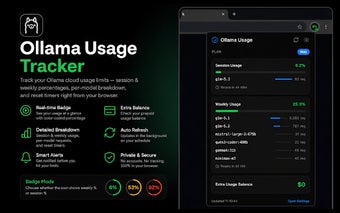
Toolbar quota monitor for Ollama Cloud users in Chrome
Ollama Usage Tracker, developed by anhtuannguyen6, is a Chrome extension that gives developers and researchers a persistent view of Ollama Cloud consumption. It places a badge in the toolbar and a popup dashboard to show usage percentages, recent sessions, and visual alerts without switching to the Ollama dashboard. The extension updates on a configurable schedule and provides quick notifications, making it useful for AI practitioners who need continuous quota awareness while keeping data local to the browser.
How the extension obtains usage numbers for quick checks
The extension reads usage data directly from your active Ollama session at ollama.com/settings, so it does not require an API key or extra logins. That zero-configuration approach uses existing browser cookies to fetch session and weekly statistics. A per-model request breakdown in the popup helps identify which models consume the most quota, letting developers focus optimization efforts where they matter.
How frequently it updates and what you can control
Background updates run on a user-set interval, adjustable from one to sixty minutes, allowing a balance between freshness and background activity. Settings let you define threshold notifications and choose what the badge shows. The extension also displays automated reset timers for session and weekly windows and can surface prepaid balance information where applicable.
- Refresh interval: 1–60 minutes
- Threshold-based desktop notifications
- Badge modes: weekly or session percentage
What the extension does with your data and privacy posture
The project is open source and keeps tracked data local to your browser, avoiding external accounts or third-party services. It works by using your active browser session rather than asking for stored credentials, and it does not require an API key. The design places usage telemetry in browser storage, which limits external sharing and matches the developer's local-first approach.
Who benefits and how it fits into a development workflow
The extension is aimed at developers, researchers, and AI enthusiasts who manage Ollama Cloud tiers and want persistent quota awareness during active work. It runs on Chrome and other Chromium browsers such as Edge, Brave, and Vivaldi, and its notifications and per-model visibility reduce the need to keep the Ollama settings page open. Use it as a lightweight companion to the official dashboard when managing model consumption during a project.
Best for quota-conscious developers and researchers
This extension suits developers and AI practitioners who need steady awareness of their Ollama Cloud consumption while they work. It favors hands-on workflows where avoiding unexpected interruptions matters. Practical tip: keep a dedicated browser profile for your Ollama sessions so tracking stays consistent across projects. Choose it when you need continuous quota visibility during active development.